The short version: Buy an Airalo eSIM in the app before you fly, install it in a few minutes, and your phone connects to a local network the moment you land. No SIM kiosk, no paperclip, no $12-a-day roaming charge waiting on your next bill.
Your phone plan wasn’t built for abroad
You land at Heathrow, Narita or Mexico City, turn off airplane mode, and your phone does one of two things. Either it shows no service at all, or it quietly starts running up a roaming bill. Meanwhile, you need a ride, directions to the hotel, and a way to text home that you made it.
For years, Americans have had three ways to deal with this, and none of them is great:
- Pay your carrier’s international day pass. It’s the easiest option, but it adds up fast. Verizon’s TravelPass costs $12 a day in most countries and $6 a day in Mexico and Canada (Verizon). AT&T’s International Day Pass runs about $10 per line, per day (AvoidRoaming). A two-week trip for a couple can cost more than $300 before you’ve posted a single photo.
- Buy a local SIM at the airport. Cheaper, but it means standing in line after a long flight, decoding a plan written in another language, and prying out your US SIM with a paperclip. Then you have to keep track of that tiny chip for the rest of the trip.
- Rent a pocket Wi-Fi hotspot. Handy for families, but it’s one more gadget to reserve, pick up, charge every night and return. If the person carrying it wanders off, everyone else loses their connection.
There’s a fourth option that has quietly become the default for frequent travelers: the travel eSIM. And the company that popularized it is Airalo. This guide covers what an eSIM actually is, how Airalo works, how to pick the right plan, how to set it up, whether your phone is compatible, and how to shave a few more dollars off the bill. We’ll also be upfront about the limitations, because a guide that only sells you on something isn’t much of a guide.
What is an eSIM, anyway?
An eSIM, short for embedded SIM, is a SIM card you never touch. Instead of a plastic chip that slides into a tray, it’s a small chip built into your phone’s hardware. A carrier’s plan is downloaded to that chip as a digital profile, much the way you’d download an app.
Airalo puts it simply: an eSIM is like a digital SIM card. It connects phones, tablets and even some laptops to mobile networks, just like a physical SIM does. The difference is that switching “cards” takes a few taps instead of a paperclip.
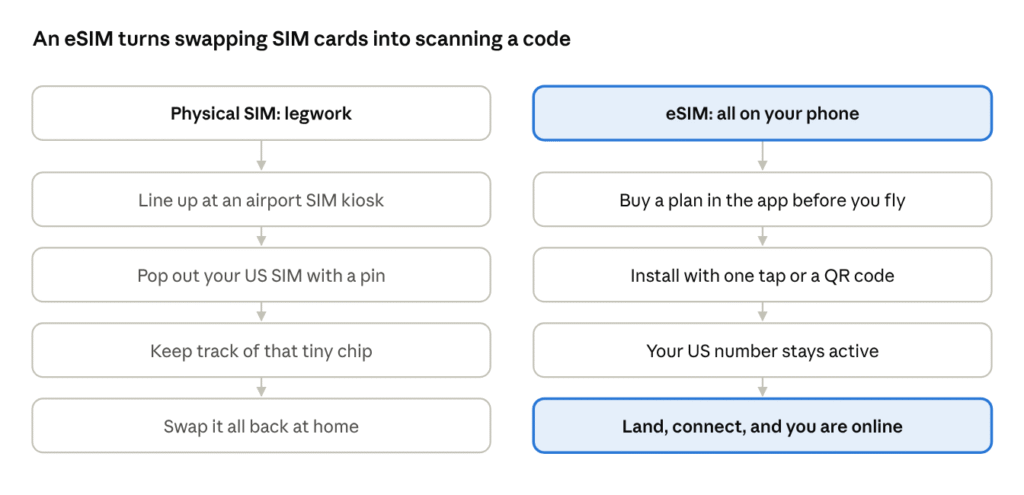
Physical SIM vs eSIM · getting online abroad, step by step
If you bought an iPhone in the US in the last few years, you’re already using one. Apple dropped the physical SIM tray from US models starting with the iPhone 14, so your everyday Verizon, AT&T or T-Mobile line already lives on an eSIM. A travel eSIM is simply a second profile that sits alongside it.
For travelers, that setup brings three practical advantages:
- You can sort it out before you leave. Buy and install the eSIM at home, at the gate or on in-flight Wi-Fi. When the wheels touch down, you’re ready.
- Your US number stays on. Most eSIM phones run two lines at once. Keep your home line on for calls and bank verification texts, and let the travel eSIM handle data. Just leave data roaming off on your US line so it doesn’t rack up charges.
- One phone can hold several. Your Japan eSIM from spring and your Europe eSIM from summer can both stay saved on the phone, ready for the next trip.
There’s also no plastic, no packaging and no chance of losing a tiny chip in a hotel room. If you travel for work several times a year, that convenience adds up quickly.
Who is Airalo?
If eSIM is the technology, Airalo is the store that made it easy to buy. Founded in 2019, it calls itself the world’s first eSIM store. The founders’ pitch will sound familiar to anyone who has traveled with a US phone plan: huge roaming bills, dropped service and hunting for free Wi-Fi were problems they wanted gone.
Airalo doesn’t build cell towers. It partners with local carriers around the world and packages their service into prepaid data plans you can buy from one app. In Japan, for example, the primary network is SoftBank. You get a local network’s coverage and pricing, while shopping, installing and topping up all happen in one place, in English, billed in US dollars.
A few numbers give a sense of its scale:
| Founded | 2019 |
| Users | 30 million+ |
| Coverage | 200+ countries and regions |
| App languages | 53, with multiple currencies |
| App store ratings | 4.7 on iOS, 4.6 on Android |
| Support | 24/7, multilingual, including WhatsApp |
Figures from Airalo’s homepage and About Airalo, checked September 2026.
Investors have noticed, too. In July 2025, Airalo announced a $220 million funding round led by CVC, making it the first eSIM company valued at over $1 billion (press release). Its earlier backers include the venture arms of several major telecom groups, including Deutsche Telekom, Orange and Telefónica.
Why should a traveler care about any of that? Two reasons. First, a company this size isn’t likely to vanish with your unused data balance. Second, deep carrier relationships mean you’re more likely to find a plan for the less obvious stops on your itinerary, not just London and Paris.
Airalo also runs a business platform, Airalo for Business, for companies that want to manage eSIMs for traveling employees. If you’re the person who books your team’s trips, that’s worth a look. For this guide, though, we’ll stick to the consumer app most travelers use.
Local, regional or global: picking the right plan
Open Airalo’s eSIM store and you’ll see three doors: Local, Regional and Global. Choosing between them comes down to one question: how many countries are on this trip?
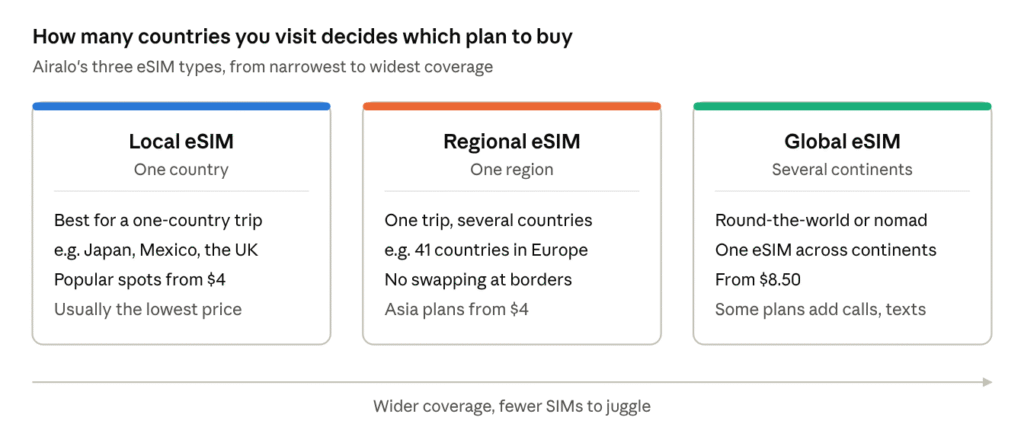
Local, regional and global plans · starting prices from airalo.com, September 2026
Local eSIMs cover a single country. They’re the right call for a week in Tokyo, a long weekend in Cancún or a business trip to London. On Airalo’s site, the most popular destinations, including Mexico, Japan, Italy, the UK, Spain, France, South Korea, Turkey and Portugal, all start at $4. Canada starts at $7. If you’ll mostly be on hotel Wi-Fi and just need maps and messaging during the day, a small data pack is often plenty.
Regional eSIMs are built for multi-country itineraries. The Europe plan covers 41 countries on one eSIM, so you can take the train from Paris to Amsterdam, fly on to Prague and never think about your connection. Your phone simply latches onto a local network after each border. Airalo also sells regional plans for Asia, Latin America, the Caribbean, the Middle East and North Africa, Oceania, North America, and even a dedicated Africa Safari plan.
Global eSIMs are for round-the-world trips, digital nomads and anyone whose job sends them to several continents a year. They start at $8.50, and some global packages include calls and texts as well as data. The upside is flexibility: change your plans mid-trip and your data comes with you. One caveat: “global” means most of Airalo’s destinations, not every single one, so check the country list if you’re headed somewhere off the beaten path.
Data amount and validity
Once you’ve picked a type, you choose two more things: how much data and for how long. Airalo sells fixed packs (think 1GB, 3GB, 5GB and up) as well as unlimited-data plans priced by the number of days.
A simple rule of thumb: if you mainly use maps, translation and messaging, a fixed pack is the better value. If you stream, post a lot of photos and video, or simply don’t want to watch a data meter on vacation, unlimited is worth the premium. Read the plan details before you buy, since some unlimited plans slow down after a daily high-speed allowance. We break down real-world data estimates in the second post in this series.
Set up in five minutes
The whole process is three steps at home and three on arrival. The key thing to understand is when the clock starts: on most Airalo eSIMs, the validity period begins when the eSIM first connects to a supported network at your destination, not when you buy or install it (Airalo Help Center). That means you can set everything up days before your flight without wasting a single day of your plan.
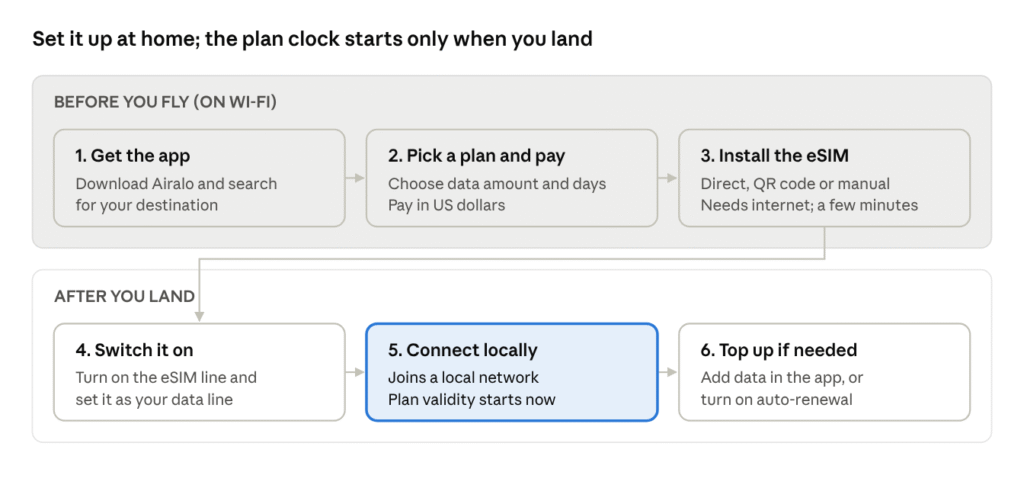
Airalo setup · six steps, three before departure
Here’s what each step looks like in practice.
1. Get the app. Airalo works on the web, but the iOS and Android apps make it easier to install and manage plans on the go. Create an account and search for your destination.
2. Pick a plan and pay. Pick the data amount and number of days that fit your trip. Prices can be shown in US dollars, so there’s no mental currency math at checkout.
3. Install the eSIM. Airalo offers three ways to install on an iPhone. The Direct method is the fastest: tap a button in the app and iOS walks you through it. You can also scan a QR code from another screen, or enter the details manually. Whichever you choose, you need a stable internet connection, which is why it’s best done at home or on airport Wi-Fi. Give the new line a clear label, such as “Airalo Japan”, so you can tell it apart from your US line.
4. Switch it on. When you land, turn on the Airalo line and select it for cellular data. Airalo’s setup instructions will also tell you whether to turn on data roaming for that line, which is common for travel eSIMs. At the same time, turn data roaming off on your US line so your home carrier can’t start charging.
5. Connect locally. Within a minute or so, your phone should pick up a local network. That’s the moment your plan’s validity starts.
6. Top up if needed. Running low? Buy a top-up in the app and it’s added to the same eSIM, with no new QR code required. You can also turn on renewals, which automatically buy a new package when your eSIM gets down to 10% of its data.
If anything goes wrong, Airalo offers 24/7 support in multiple languages, including over WhatsApp. That’s reassuring when it’s 2 a.m. back home and you’re standing in a train station in Rome.
Will your phone work?
For most Americans, the answer is yes. Airalo lists three requirements for any device: it must support eSIM, it must not be carrier-locked, and it must not be jailbroken (iOS) or rooted (Android) (How Airalo works). It also warns that some regional versions of a phone don’t support eSIM, even when other versions of the same model do.
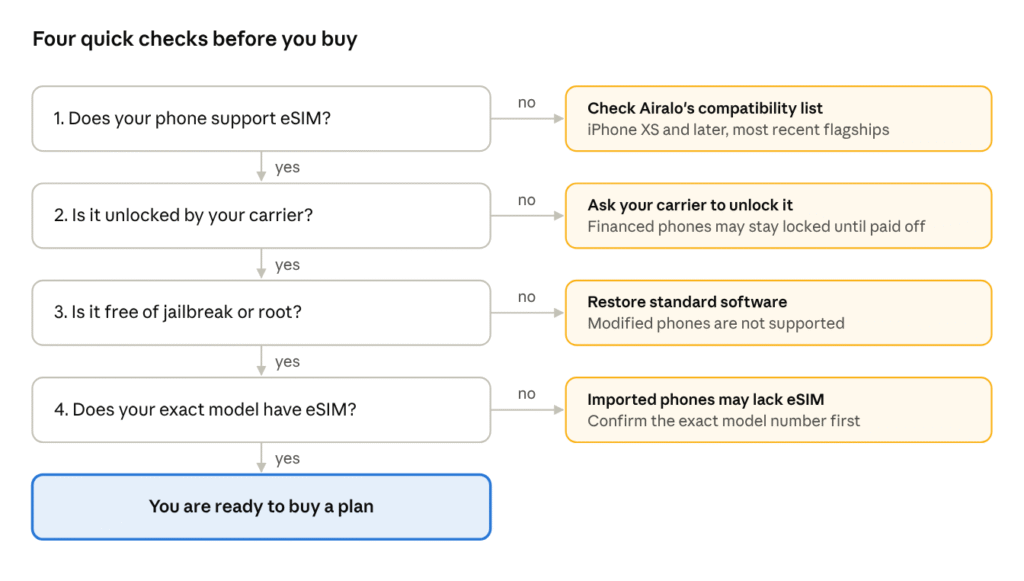
Compatibility checklist · based on Airalo’s device requirements
Walk through the four checks in order:
1. eSIM support. Every iPhone from the XS onward supports eSIM, and US iPhones from the 14 onward don’t even have a SIM tray. Recent Google Pixel and Samsung Galaxy flagships support it too. The quickest test on an iPhone is to go to Settings > Cellular and look for Add eSIM. On Android, look for an option to add an eSIM or a carrier in your SIM settings. If you’re unsure, Airalo keeps a device compatibility list that’s updated regularly.
2. Carrier lock. This is the one that trips up the most US travelers. If you bought your phone through Verizon, AT&T or T-Mobile, especially on an installment plan, it may be locked to that carrier until it’s paid off or a waiting period has passed. A locked phone simply won’t accept another carrier’s eSIM. Call your carrier or check your account online, and request an unlock well before your trip, since it can take a few days.
3. No jailbreak or root. If you’ve modified your phone’s operating system, Airalo’s eSIMs aren’t supported. This won’t apply to most people.
4. The exact model. Phones bought abroad or through gray-market sellers may be built for markets where eSIM is disabled. If your phone wasn’t bought in the US, look up the model number before you buy a plan.
Running two lines at once
Once you’re set up, your phone will show two lines, your US number and your Airalo eSIM. A sensible setup for most travelers:
- Airalo eSIM: cellular data.
- US line: on for calls and texts, but with data roaming off. You’ll still receive bank verification codes by text, and iMessage and FaceTime keep working over your Airalo data.
- Wi-Fi Calling: if your carrier supports it, turn it on so you can make and receive calls to your US number over data without roaming charges. Check your carrier’s terms first.
One note: most Airalo plans are data-only, meaning you don’t get a local phone number. For most tourists that’s fine, since WhatsApp, iMessage and FaceTime cover calling. If you need a local number, look for the packages that include calls and texts.
Earn some of it back: Airmoney, referrals and top-ups
Airalo rewards repeat customers with Airmoney, a store credit you can put toward future eSIMs and top-ups. Every account starts at the Traveler tier with 5% cashback on each purchase you pay for. The more you spend, the higher the rate climbs, up to 10% (Airalo loyalty program).
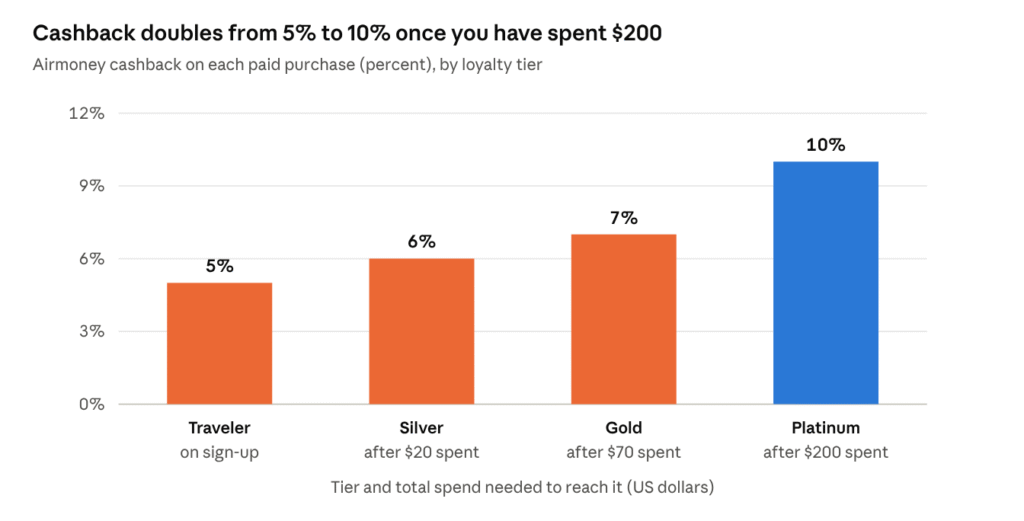
Airalo loyalty program tiers · airalo.com/loyalty-program, September 2026
The thresholds are low enough that a single big trip can move you up. Spend the equivalent of $20 and you’re Silver; $70 gets you to Gold; $200 unlocks Platinum. One detail worth knowing: purchases you pay for with Airmoney don’t count toward your tier, only money you actually spend does.
What does that look like in real dollars? Say you buy a 7-day unlimited plan for Japan at the current price of $26.50. As a brand-new Traveler, you’d get about $1.33 back. Once you’ve reached Platinum, the same plan earns about $2.65. It isn’t life-changing money, but for a family that travels a few times a year, the credit quietly covers a small data pack for the next trip.
Refer a friend, both of you save
Airalo’s referral program is simple. Share your code, and a friend gets $3 off their first purchase. When they buy, you get $3 in Airmoney (Refer and earn). There’s no cap on how many people you can refer. Since a small eSIM for many popular countries starts at $4, a single referral can nearly pay for your next one.
Top up instead of starting over
Many Airalo eSIMs can be topped up. When you run low, you buy another package for the eSIM that’s already on your phone instead of installing a new one. That saves you from juggling several profiles, and it means you can start with a smaller, cheaper pack and add more only if you need it.
For travelers who’d rather not think about it at all, there’s auto-renewal. Turn it on in your eSIM’s details, and Airalo renews the package automatically when you’re down to 10% of your data. Just remember to turn it off when you’re heading home, so you don’t pay for a package you won’t use.
A few more money-saving habits
- Download offline maps for your destination before you leave. Google Maps and Apple Maps both support it, and it cuts your data use substantially.
- Set apps to update on Wi-Fi only, and turn off automatic photo backups to iCloud or Google Photos while you’re on cellular.
- Buy early, not at the airport. Because the validity period starts when you connect at your destination, there’s no penalty for buying a week ahead. You’ll have time to sort out any compatibility issues at home.
How Airalo stacks up against the alternatives
Every way of getting online abroad trades cost against convenience. Here’s how the four common options compare for a typical American traveler.
| Option | What it costs | Setup | Keeps your US number? | Best for |
|---|---|---|---|---|
| Airalo eSIM | From $4 for a small local pack; unlimited plans priced by the day | Five minutes in the app, at home | Yes, both lines run at once | Most solo travelers and couples with eSIM phones |
| Carrier day pass | About $10 to $12 per line, per day in most countries (Verizon, AT&T) | Nothing to do, charged automatically | Yes | Very short trips, or a single day of travel |
| Local SIM card | Often cheap, varies by country | Line up on arrival, swap cards | Only if your phone has a second SIM slot | Long stays in one country |
| Pocket Wi-Fi rental | Daily rental fee, plus pickup and return | Reserve, pick up, charge nightly, return | Yes | Groups sharing one connection |
The carrier day pass is still the lowest-effort option, and for a one-day layover it can make sense. But the math shifts quickly. On a seven-day trip, $12 a day is $84 per person. An Airalo plan for the same trip will typically cost a fraction of that, and the gap only grows with every extra traveler and every extra day. We run those numbers destination by destination in part two.
A local SIM can still win on price for long stays, especially if you’ll be in one country for a month or more and want a local number. The trade-off is the time it takes to buy one on arrival, and the risk of losing your US SIM, if your phone still has one.
Pocket Wi-Fi has a real niche: a family of four with older phones that don’t support eSIM. For everyone else, a device you have to carry, charge and share is one more thing to worry about.
Who Airalo is best for
Airalo is a great fit if you’re:
- A first-time international traveler who wants something that just works, with clear instructions in English and support around the clock.
- A multi-country traveler doing Europe by train, Southeast Asia by plane, or a cruise with several ports of call. One regional eSIM saves you from buying a new SIM at every border.
- A frequent business traveler who wants to keep a US number active for work calls while using cheaper local data, and who’ll climb the loyalty tiers quickly.
- A remote worker or digital nomad who needs data across several continents and doesn’t want to manage a different SIM in every country.
It may be less ideal if your phone is carrier-locked and can’t be unlocked in time, if you need a local phone number for a long stay, or if you’re shopping purely for the lowest price per gigabyte and don’t mind switching providers for every trip.
The honest caveats
Airalo is a strong default for most trips, but it isn’t perfect, and knowing its limits will save you a frustrating moment abroad.
It’s not always the cheapest. Airalo is the biggest name in travel eSIMs, not the bargain bin. Independent reviewers generally find it priced competitively without being the outright lowest for every country (Finding the Universe). Some prices have also gone up. Travel sites reported sharp increases to Japan’s unlimited plans in early 2026, and the 7-day unlimited plan now costs $26.50 on Airalo’s site. If you’re chasing the absolute lowest price per gigabyte, it’s worth comparing. What you pay for with Airalo is breadth of choice, a polished app and round-the-clock support.
Most plans are data-only. You usually won’t get a local phone number, so you can’t receive calls from a local restaurant or tour operator on a regular number. Messaging apps handle most of this, and some packages do include calls and texts.
“Unlimited” can have fine print. Some unlimited plans reduce your speed after a daily high-speed allowance. That’s fine for maps and messaging, but it can slow down video calls. Check the plan details before buying.
It needs a compatible, unlocked phone. If your phone is still locked to your carrier, an eSIM won’t help you until it’s unlocked. Sort this out at home, not at the gate.
Installation needs internet. You can’t install the eSIM without a connection. That’s why we recommend doing it before you leave, rather than trying to find airport Wi-Fi on arrival.
Don’t delete it by accident. Removing an eSIM from your phone’s settings generally can’t be undone the way popping a physical SIM back in can. If you need to tidy up, wait until your trip is over and the plan has expired.
None of these are deal-breakers. They’re simply the things to know before you go, and most of them take less than five minutes to deal with at home.
Frequently asked questions
When should I buy and install my eSIM? Any time before your trip. Airalo recommends installing it while you have a stable internet connection. On most eSIMs, the validity period only starts when the eSIM connects to a supported network at your destination, so installing a week early doesn’t cost you any days.
Will I lose my US phone number? No. Your US line stays on the phone. You can keep it active for calls and texts while the Airalo eSIM handles data. Just turn off data roaming on your US line so your carrier doesn’t charge you.
Can I use my phone as a hotspot? It depends on the package. Hotspot rules vary by plan and destination, so check the plan details in the app before you count on tethering a laptop or a travel partner’s tablet.
What happens when my data runs out? You can buy a top-up for the same eSIM in the app, or turn on renewals so a new package is added automatically when you reach 10% of your data.
Can I reuse the eSIM on my next trip? Often, yes. If top-ups are available for that eSIM, you can add a new package to it rather than installing a fresh one.
Does Airalo work in the US? Yes. Airalo sells US eSIMs, starting at $4. That’s useful for international visitors, and for Americans whose main phone plan has limited data.
What if something goes wrong? Airalo offers 24/7 support in multiple languages, including through WhatsApp and live chat in the app.
The bottom line
If you travel abroad even once a year, a travel eSIM is one of the easiest upgrades you can make to your trip. It takes about five minutes to set up at home, it keeps your US number working, and it costs a fraction of a carrier’s $10-to-$12-a-day roaming pass.
Airalo makes that switch especially painless. It covers more than 200 countries and regions, offers plans for every trip size, and pays you back in Airmoney for staying loyal. It won’t always be the cheapest option on the market, but it’s the one we’d point a first-timer to.
Next in this series: we put Airalo to work on real itineraries, from a week in Japan to two weeks across Europe to a quick trip to Mexico, and do the math against carrier roaming, day by day.
Prices and plan details were checked on airalo.com in September 2026 and can change. Always confirm the current price and plan terms in the app before you buy.